Haier Group / Home-appliance field service
Mobile work orders from dispatch through proof of repair at Haier
Customer deployment reference / UROVO hardware platform
Haier connected service-center dispatch, technician work orders, product-code capture, spare-parts requests, repair records, electronic warranty updates, on-site payment and receipt printing in one mobile field-service workflow.

Case Studies
Design the mobile workflow before locking the device SKU.
The fixed information system did not provide a reliable handoff from the service center to field technicians. Cases could be misplaced or left without follow-up, repair feedback was entered manually with errors and delays, and managers lacked current location, service-quality and customer-feedback records for dispatch and performance review.
Workflow solutions
Priority workflows
The service center uploads a structured work order for the technician to download. In the home, the technician reviews the customer and fault record, scans the product identifier, records the diagnosis, repair procedure and expense, requests spare parts when needed, updates the electronic warranty and closes the maintenance file. The documented flow also includes on-site card payment and immediate receipt printing.
DevicesUROVO mobile computer, payment interface and mobile printer
Solution planning sequence
Solution planning sequence
A reliable deployment combines the right capture method, application behavior, connectivity, ergonomics, charging and replacement process. Solution design keeps those choices connected.
01 / Create and dispatch
Convert the customer call, product and fault description into a structured work order.
Gives the service center and technician one task record instead of a verbal or paper handoff.
02 / Accept and navigate
Download the assignment and review the customer, asset and service history before arrival.
Lets the technician prepare the correct skills, tools and likely parts without returning to an office.
03 / Identify and diagnose
Scan the product code and record the observed fault at the service location.
Binds the diagnosis to the correct product, customer, warranty and work-order record.
04 / Repair and consume parts
Record the repair procedure, parts request or parts consumption and any chargeable work.
Keeps inventory, cost and service records aligned with what actually happened in the field.
05 / Close and prove service
Update the electronic warranty, collect payment when required, print the receipt and capture customer feedback.
Creates a complete proof-of-service record before the technician leaves the site.
06 / Analyze service data
Synchronize the closed maintenance file for dispatch, performance and recurring-fault analysis.
Turns individual repair events into operational and product-quality information.
Case Studies
Outcome-led scope
Solution pages will recommend capabilities first. Exact models remain replaceable until testing confirms the best fit.
Dispatch control
Technician location and service activity can be tracked for remote resource dispatch.
Service feedback
Fault and repair data moves back to the business in real time for product-quality analysis.
Technician productivity
Technicians can accept and complete tasks without returning to the office for case files.
Maintenance records
Product-code scans update service records and support monthly operating reports.
Engineering and supply services
Five service layers for a more predictable device program.
RuggedLayer organizes access to multiple manufacturers into a consistent engagement model. Each layer has a defined input, deliverable and evidence boundary. Hardware margin, validation, staging, project management and lifecycle support are distinct value streams. Scope and fees depend on the project.
Select
Service-center dispatchers, field technicians, parts coordinators, supervisors and customer-service analysts.
Validate
Work-order, product barcode, diagnosis, parts, photo, warranty, payment, receipt and customer-confirmation events.
Deploy
Field-service management, CRM, product and warranty records, parts inventory, payment service, reporting and device management.
Commercial boundaries
Variable cellular coverage, customer premises, one-person operation, sensitive customer data, vehicle charging and printer pairing.
A clear handoff at every layer
Five service layers for a more predictable device program.
Hardware margin, validation, staging, project management and lifecycle support are distinct value streams. Scope and fees depend on the project.
Technician application
The mobile flow carries assignment, customer and asset context through diagnosis, parts, evidence, signature, payment and closure.
Commercial boundariesRuggedLayer maps and validates the device-side service flow; the service platform owner controls dispatch, entitlement, pricing and warranty rules.
Field device and peripherals
A managed mobile computer combines barcode, camera, GNSS, optional payment and mobile printing with vehicle or overnight charging.
Commercial boundariesRuggedLayer selects, configures and validates devices, printers, mounts, charging and the agreed application package.
Mobile synchronization
Cellular and Wi-Fi transport synchronizes jobs and evidence while encrypted local queues preserve work through weak or unavailable coverage.
Commercial boundariesRuggedLayer validates reconnect, queue and peripheral recovery; production identity, API and data-retention controls remain with the system owner.
Service systems of record
CRM, field-service management, warranty, parts, payment and reporting systems retain the authoritative customer and service history.
Commercial boundariesRuggedLayer reviews interfaces and handover requirements within scope; customer teams approve business data and financial controls.
Publication gate
Comparable device evidence with method, version and limitations.
The Test Lab defines what must be recorded before a manufacturer reference or RuggedLayer observation can support a purchase or deployment decision.
Publication gate
- 01
The scanned product is not covered by the downloaded work order or warranty record.
Stop warranty closure, preserve the observed identifier and request dispatch or entitlement review before repair is finalized.
- 02
Required spare parts are unavailable or substituted.
Record the request and status, keep the job open or rescheduled and prevent unapproved part consumption.
- 03
Payment, printing or final synchronization fails at the customer site.
Retain one pending transaction, issue no duplicate charge and provide the approved deferred receipt or support route.
How to read the references
Work-order lifecycle
Dispatch, acceptance, arrival, diagnosis, parts, repair, warranty and closure states remain linked to one case.
Offline continuity
The technician can complete the approved offline steps and later synchronize without duplicate jobs, parts or payment records.
Peripheral workflow
Barcode capture, payment and mobile printing recover cleanly from disconnect, cancel and retry scenarios.
Proof of service
A closed job contains the required product, technician, time, action, parts, customer confirmation and financial status.
A clear handoff at every layer
Choose the first service layer.
A short requirement review will identify whether selection, validation or customization comes first.
01 / Discover
An end-to-end service map covering dispatch, identity, asset history, parts, evidence, payment, closure and offline requirements.
02 / Field kit validation
A configured device and peripheral kit tested with the current app, real asset codes, vehicle charging and weak-network scenarios.
03 / Technician pilot
A representative technician group with baseline completion times, failed-sync review, support logging and customer-data controls.
04 / Fleet rollout
Enrollment, configuration, kit assignment, training, spare devices, printer supplies, support escalation and lifecycle handover.
Enterprise device portfolio
Mobile computers, barcode scanners and RFID readers by workflow.
A final shortlist depends on the application, scan or RFID workload, operating environment, country, deployment volume and support expectations.
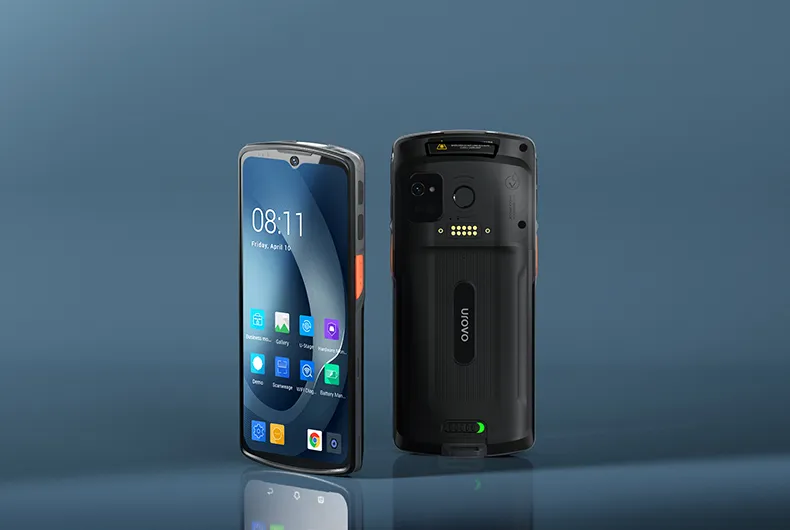
UROVO / Enterprise mobile computer
DT66
Full-touch 5G-capable platform for modern field applications.Devices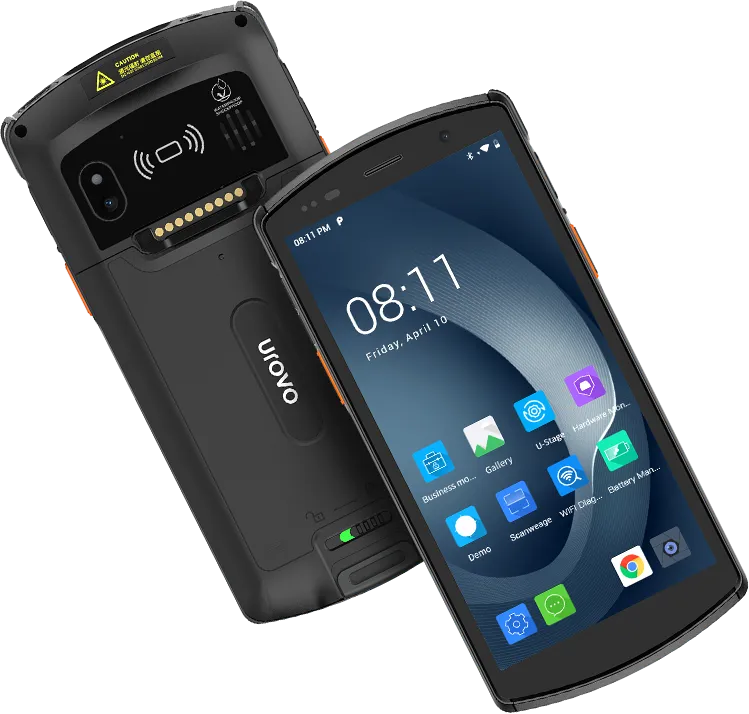
UROVO / Rugged handheld computer
DT50
General-purpose rugged handheld with a replaceable-battery option.Devices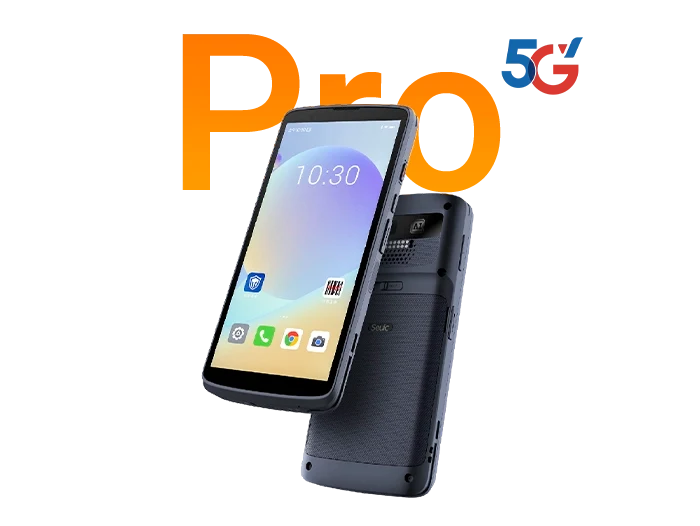
SEUIC (Dongji) / Touch mobile terminals
CRUISE2 5G Pro
Full-touch 5G terminal option for connected field workflows.DevicesProject intake
Project intake form
Submit the form to request a shortlist, validation plan, sample discussion or scoped OEM feasibility review. Restricted files require a separately agreed transfer method.